Kwevio features
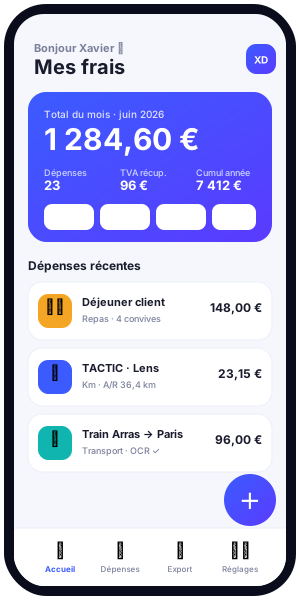
Kwevio is a free application for managing professional expenses that permanently replaces the Excel spreadsheet. Designed for freelancers, small businesses, sales representatives and company directors, it brings together in a single interface everything you need to record, calculate, justify and export your expense reports — from mileage expenses to business meals, transport, accommodation and miscellaneous costs.
Available on Android, iOS and as a lightweight installable web app (PWA), Kwevio works online and offline, with or without an account. This page reviews, feature by feature, everything the app can do to save you time and secure your bookkeeping.
The starting observation is shared by thousands of professionals: expense management remains one of the most time-consuming and error-prone administrative tasks. One Excel tab per month, rate formulas copied from year to year, crumpled receipts at the bottom of a wallet, and at filing time the feeling of starting all over again. Kwevio was designed to remove that friction. Every screen, every automation aims at a single goal: that you spend as little time as possible on admin and as much time as possible on your job.
Overview
Kwevio was created by Xavier Deloffre (FACEM WEB, Arras) from a very concrete need: replacing a mileage expense spreadsheet that had become too tedious to maintain. From that starting point grew a complete application covering the entire life cycle of a professional expense.
The guiding idea is simple: you record an expense in a few seconds, the app handles the calculations (distance, mileage rate, recoverable VAT), and by the time you file your claim or send it to your accountant, everything is already prepared. No more formulas to fix, no more lost receipts, no more mileage rate to look up every year.
Kwevio is multilingual (French and English today, with German, Italian, Spanish and Dutch to follow) and multi-country, making it suitable for a French freelancer as well as a sales representative crossing European borders.

Expense categories
All your professional expenses have their place in Kwevio thanks to categories designed for real-world use. Each category has its own fields, for fast entry and a clear summary.
This organisation into categories is not just a cosmetic classification: it drives the calculations and the export. A fuel expense does not follow the same logic as a mileage allowance, and a business meal calls for fields that a hotel night does not require. By adapting the entry to the nature of each cost, Kwevio ensures that nothing useful is forgotten and that the final declaration is complete.
Mileage expenses
The historical heart of the app. You enter a starting point and a destination, choose a one-way or round trip, and Kwevio calculates the mileage allowance according to your country's rate.
Transport
Train, plane, taxi or ride-hailing: record your tickets and rides with the amount, the date and the attached receipt. Ideal for trips where you don't use your personal vehicle.
Meals and entertainment
Business meals are handled in detail: you can specify the number of guests and the list of attendees, valuable information to justify the expense and, where applicable, the recoverable VAT.
Accommodation
Hotel nights and short-term rentals are declared in seconds, with a photo of the receipt to back them up.
Miscellaneous
Tolls, parking, supplies, small purchases… The "miscellaneous" category covers everything that doesn't fit the other headings, without ever blocking your entry.
Automatic mileage: OpenStreetMap + rate
This is one of the most appreciated features. Instead of painstakingly reading your odometer or making rough estimates, you let Kwevio do the work.
The road distance is calculated automatically via OpenStreetMap (OpenRouteService engine). You enter the start address and the destination address, and the app determines the real route by road. The starting point is variable: it is not locked to a single address, which fits sales rounds and multiple trips.
You then choose one-way or round trip, and the calculation adjusts instantly. The mileage rate applied depends on the country of travel:
- France: a rate based on fiscal horsepower (CV) and on distance brackets. Importantly, beyond 5,000 km driven in the year, the formula of the upper bracket applies to the entire annual distance: Kwevio performs this retroactive recalculation for you. Electric vehicles benefit from a 20% increase.
- United Kingdom: 55 pence per mile up to 10,000 miles, then 25 pence beyond.
- Germany and Luxembourg: about EUR 0.30 per kilometre.
- Belgium: about EUR 0.4259 per kilometre.
- Spain: about EUR 0.26 per kilometre.
- Netherlands: about EUR 0.23 per kilometre.
- Switzerland: about CHF 0.75 to 0.76 per kilometre.
- Italy: ACI tables.
These amounts are indicative on a 2025 basis. The app keeps the mileage rate up to date so that your mileage allowance stays faithful to the rules in force in each country.
A concrete calculation example
Take a French sales representative driving a 5 CV vehicle. Early in the year, their trips are reimbursed according to the bracket for a distance below 5,000 km. As soon as the annual total crosses that threshold, the upper bracket's formula applies retroactively to all the kilometres already driven. Doing this by hand is tedious and error-prone: Kwevio handles it automatically and updates every affected trip. You immediately see the effect on your total mileage allowance.
Another common case: the electric vehicle. In France, the rate provides for a 20% increase. You have nothing to calculate — simply indicate the vehicle type, and the app applies the increase to each trip. The same principle applies internationally: depending on the country selected, Kwevio switches to the local rate (pence per mile in the UK with the 10,000-mile threshold, per-kilometre rates in the euro zone, francs per kilometre in Switzerland, ACI tables in Italy), without you having to know the rules by heart.
Receipt OCR
Photographing a receipt and re-typing everything by hand is over. Kwevio's optical character recognition (OCR) reads your receipt and automatically pre-fills the amount and the date.
A key point on privacy: the OCR runs 100% in your browser, thanks to Tesseract.js. Your receipts are not sent to any server to be analysed — the processing stays on your device. You save time without sacrificing anything in terms of data protection.
It works instantly: you open the entry for a new expense, take a photo of the receipt, and the fields fill in. You of course keep control to correct or complete any information before saving. This "local-first" approach has a double advantage: speed, because no network round trip is needed, and privacy, because your receipts — which often carry sensitive information — never leave your device to be read.
Recoverable VAT tracking
Managing recoverable VAT is often a chore. Kwevio simplifies it radically: you simply enter the tax-inclusive amount shown on your receipt, and the app automatically calculates the net amount and the recoverable VAT according to the applicable rate and country.
At the end of the financial year, you have a clear view of the VAT you can recover, without handling any formula or risking a rounding error. A valuable asset when handing your figures to the accountant.
The tracking is consistent with the app's multi-country dimension: the rate applied depends on the country of the expense, so a meal paid for in Brussels and a meal paid for in Paris do not follow the same recovery logic. Combined with the "meals and entertainment" category and its "number of guests" field, this tracking gives you everything you need to distinguish what is recoverable from what is not, without having to improvise at closing time.
Calendar synchronisation
Your professional trips are usually already in your calendar. Kwevio uses them to save you even more time.
You can connect your Google calendar in a single tap, read-only, or import an .ics file from Outlook or iCloud. From then on, an appointment with a location can become a trip: Kwevio takes the address and calculates the distance automatically. Your on-site meetings turn into mileage expenses without any re-entry.
Suggestions, free editing and past expenses
Kwevio learns from your usage to speed up entry. The app offers suggestions based on the places and guests already recorded: a client you see regularly, a usual restaurant, a recurring trip auto-complete in just a few letters.
Editing is completely free: you can correct an expense at any time. And above all, nothing forces you to enter data day by day. You can add past expenses retroactively, which is invaluable when filling in your expense reports at the end of the month or quarter.
Dashboard and annual total
The dashboard gives you an immediate view of your professional expenses. You track the annual total of your spending, by category, month after month.
This tracking is especially useful for mileage: since the French rate changes bracket beyond 5,000 km, continuously seeing your total helps you anticipate the tax impact of your trips. The dashboard reflects in real time the recalculations the app performs for you.
Excel and CSV export
When it comes to filing or forwarding your expenses, Kwevio's accounting export makes all the difference.
- Excel export (XLSX): an annual summary together with 12 monthly tabs, ready to use.
- CSV export: to integrate your data into any accounting tool.
- You choose the granularity: monthly, annual or by category.
- The receipts are attached to the export.
- Optionally, automatic sending to the accountant spares you even the last step.
No more spreadsheet copied by hand: your data leaves Kwevio in a format directly usable by your chartered accountant.
This export is designed to speak your accountant's language. The annual summary provides the overview they need for the tax return, while the twelve monthly tabs detail each expense line by line. Because the receipts travel with the data, your contact immediately has the proof associated with each amount, which drastically reduces back-and-forth. And if you enable automatic sending, the file goes to the right address at the cadence you've set, without you having to think about it.
Multi-country and multilingual
Kwevio is designed for mobile professionals. The app handles several countries, each with its own mileage rate and VAT rules (France, United Kingdom, Germany, Luxembourg, Belgium, Spain, Netherlands, Switzerland, Italy…).
On the language side, the interface is available in French and English, with German, Italian, Spanish and Dutch planned next. Whether you declare your expenses in France or invoice your trips abroad, Kwevio speaks your language and applies the right calculations.
Offline and installation
Kwevio is a progressive web app (PWA): you install it directly from your browser, on mobile as well as desktop, without going through a store if you wish.
Once installed, it works offline. You can record an expense on a train, a plane or in an area without coverage: your data is stored locally and stays available. Synchronisation resumes as soon as the connection returns.
This independence from the network is a real asset for professionals on the move. You no longer depend on a connection to record an expense at the moment it occurs — which is precisely the best time not to forget anything. Installing it as a progressive web app also gives you an icon on your home screen, instant launch and an experience close to a native app, without the weight or constraints of a store download.
Accounts and secure synchronisation
Kwevio works without an account if you prefer to keep your data strictly on your device. But if you work across several devices, creating an account activates a secure, privacy-minded synchronisation.
- Passwords protected with scrypt and salt.
- Authentication tokens hashed and revocable.
- Per-user isolation of data.
- Conflict resolution by "last modification wins".
- Encrypted transport over TLS.
- GDPR compliance.
You retain control over your information, whether you choose the simplicity of local mode or the convenience of multi-device synchronisation.
Who is Kwevio for?
Kwevio is aimed at everyone who has to track professional expenses without spending an unreasonable amount of time on it:
- Freelancers and independents who want a clean expense report without expensive software.
- Small businesses looking for a tool that's simple to deploy.
- Sales representatives who travel constantly and want automatic tracking of their mileage expenses.
- Company directors who need a clear view and an export ready for the accountant.
Whatever the profile, the promise is the same: immediate onboarding, with no training or complex configuration. You can start without an account, test the app on your real trips, and only enable synchronisation the day you need it. This gradual approach makes Kwevio as reassuring for an occasional user as it is powerful for a professional declaring hundreds of expenses a year.
To each of these profiles, Kwevio brings the same benefit: less time wasted on admin, more reliability in the calculations.
It is also worth stressing how much this design respects your time horizon. Because you can add past expenses, you are never penalised for entering data late: a quarter's worth of receipts can be processed in one sitting, with the OCR doing the tedious typing and the suggestions recalling the places and guests you've already used. The dashboard then reconciles everything into a single annual picture, and the export turns that picture into a deliverable your accountant can open without a single question.
A free and transparent model
Kwevio is and remains free. Future monetisation will rely on a layer of reviews and content (carpooling, airlines, restaurants, venues) that is fully anonymised, on an opt-in basis, with advertising (AdMob/AdSense) and in compliance with the GDPR. Your use of the expense management tool is not conditioned on these services.
Automations that make a daily difference
Beyond each feature taken in isolation, it's their combination that changes the experience. A client appointment imported from your calendar becomes a geolocated trip; the road distance is calculated by OpenStreetMap; your country's rate applies automatically; the annual total updates and triggers, if needed, the recalculation of the brackets; and all of this lands in an export ready for the accountant. The same fluidity applies to a business meal: photo of the receipt, OCR of the amount and date, automatic breakdown of the recoverable VAT, and it's done.
This continuous chain, from the calendar through to accounting, is precisely what sets Kwevio apart from a merely improved spreadsheet. You no longer enter numbers: you describe your trips and your expenses, and the app draws the tax and accounting consequences.
Conclusion
From entry to export, Kwevio covers the entire chain of your expense reports: field-ready categories, mileage expenses calculated automatically via OpenStreetMap according to each country's rate, confidential receipt OCR, recoverable VAT tracking, calendar synchronisation, an annual dashboard and accounting export in Excel and CSV formats. All for free, offline, multi-country and multilingual.
Ready to drop your spreadsheet? Launch Kwevio now and record your first trip in a few seconds.