Receipt OCR: take a photo, it's already captured
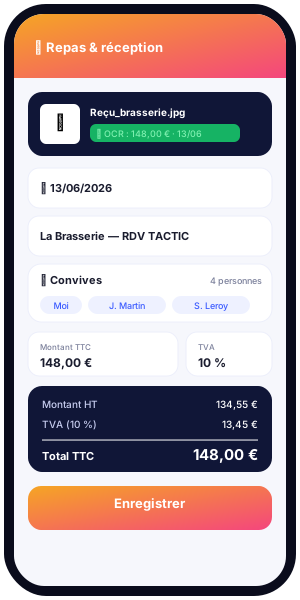
Paper receipts pile up in pockets, bags and the bottom of cars. At the end of the month, you have to track them all down, decipher crumpled tickets, copy out amounts by hand and hope nothing has gone missing. This re-entry is slow, error-prone and demotivating. Kwevio changes the game with receipt OCR: you take a photo of a receipt or invoice, and the application reads the text to automatically pre-fill the gross amount and the date. Your expense report comes together in a few seconds, with little or no typing.
In this article, we explain concretely how text recognition works in Kwevio, why it respects your privacy, what it recognises on an expense receipt, how it feeds VAT tracking, and what best practices to adopt for reliable reading. Kwevio is a free professional expense management application, available on Android, iOS and as a lightweight installable web version (PWA), designed to be multilingual and multi-country.
Whether you are a freelancer, an employee on the move, a small-business owner or someone managing a small team, handling expense reports often comes back as an administrative burden. The idea behind Kwevio's OCR is to put technology back at the service of people: let the device do the tedious reading so you can focus on your work. Let's look in detail at how this plays out in everyday use.
The problem of paper receipts and re-entry
Anyone who manages expense reports knows this tedious ritual. A client lunch, a tank of fuel, a hotel night, a train ticket: every expense leaves a small piece of paper behind. These thermal tickets fade over time, get crumpled and lost. When it is time to put the expense report together, you end up with a mixed pile to sort, read and copy into a spreadsheet or a form.
Manual re-entry raises several concrete problems:
- Wasted time: typing amounts, dates and labels one by one is repetitive work that adds up, especially for people who travel often.
- Input errors: a swapped digit, a misplaced comma, a wrong date, and the whole reimbursement or accounting entry is thrown off.
- Lost receipts: a misplaced receipt means an unreimbursed expense or a complicated tax audit, because the expense receipt is the document that proves the reality of the cost.
- Discouragement: putting the chore off turns a simple note into an administrative mountain at the end of the month.
The heart of the problem is double handling: the information already exists, printed on the ticket, yet it has to be transcribed by hand into a tool. OCR (optical character recognition) removes this useless step. Instead of reading the ticket to copy it out, you let the device read the ticket for you.
How OCR works in Kwevio
The principle is deliberately simple. When you add a real-amount expense in Kwevio, you can take a photo of the receipt directly with your phone's camera, or import an image already in your gallery. The application then triggers text recognition on that image and analyses its content.
Concretely, the journey is as follows:
- You take a photo of the receipt (or import it from your files).
- Kwevio reads the text present on the image using an OCR engine.
- The gross amount and the date are pre-filled automatically in the expense form.
- You check and confirm: you always stay in control to correct a field if needed.
The technology relies on Tesseract.js, a text recognition engine that runs directly in your device's browser. The library loads on demand: on the very first use, a network connection is needed to download it, after which it remains available for subsequent reads. Before analysis and storage, the image is downsized to optimise processing and saved space.
This way of working has an immediate benefit: the expense is created at the very moment you hold the receipt, not several days later. You no longer need to keep the physical ticket "just in case", since the useful information is already captured and the photo archived. Logging expenses as you go, one at a time, replaces the big end-of-month re-entry session.
It helps to distinguish two moments in the journey. First the capture, which means providing a readable image to the application. Then the extraction, where the OCR engine analyses that image to pull out the amount and the date. The cleaner the capture, the more reliable the extraction; that is why a whole section further down is devoted to good shooting practices.

Why focus on the TOTAL line
A receipt contains many numbers: unit prices, quantities, subtotals, taxes, change given. To avoid confusion, Kwevio's reading focuses on the line that corresponds to the amount to keep, that is the one bearing a label such as "TOTAL", "incl. tax" or "Amount". This gross amount serves as the basis for the expense and for calculating recoverable VAT.
For the date, the application recognises common formats, whether the day/month/year format (dd/mm/yyyy) or the international year-month-day format (yyyy-mm-dd). So whether a ticket shows 14/06/2026 or 2026-06-14, the expense date is correctly identified and carried over.
Privacy: everything happens on your device
Privacy is essential when handling receipts, because a receipt can reveal sensitive information: places visited, habits, amounts, sometimes names. This is why Kwevio's OCR is designed to work 100% in your device's browser.
Very concretely, this means that your receipts are not sent to a third-party server to be analysed. Text reading happens locally, where the image is, on your phone or your computer. No receipt photo is sent to a remote recognition service to perform the OCR.
The benefits of this approach are direct:
- Your data stays with you: receipt content is not transmitted to an external provider for recognition.
- Fewer dependencies: once the library is loaded, processing does not rely on sending each image to the cloud.
- A frugal logic: the image is downsized before storage, which limits the size of the data kept.
This "on-device" philosophy is consistent with the spirit of Kwevio: a simple, free and user-respecting tool that keeps you in charge of your information.
Concretely, on first use, the recognition library is downloaded once over the network, and then it runs locally afterwards. So it is the engine's components that travel over the network, not your receipts. Once in place, recognising a new receipt happens on your device, where the image lives.
This difference matters. Many scanning tools rely on systematically sending each image to a remote service to read it. With Kwevio, it is the opposite: the intelligence comes to the image rather than the image going to the intelligence. For anyone handling professional data or personal information shown on receipts, this is peace of mind.
What is recognised on the receipt
The goal of OCR is not to transcribe everything word for word, but to extract the useful information to build the expense. Kwevio focuses on the key elements of an expense receipt.
The amount
The gross amount is the central piece of information. The reading looks first for the "TOTAL / incl. tax / Amount" line in order to keep the sum actually paid. This amount is entered into the form and then used for accounting and tax calculations.
The date
The expense date is extracted from the recognised formats (dd/mm/yyyy and yyyy-mm-dd). It matters for attaching the expense to the right period and for complying with reimbursement rules.
The merchant and the context
The merchant's name and other visible labels on the ticket add context. The photo of the receipt is kept and linked to the expense: even if a detail is not extracted automatically into a field, the image remains available as proof and reference. You can thus complete the expense label by relying on the scanned receipt.
The associated VAT tracking
Beyond the time saved, OCR directly feeds another strong point of Kwevio: VAT tracking. From the gross amount read on the receipt, the application can calculate the net amount and the recoverable VAT.
For professionals, this is a major asset:
- Immediate visibility: you know, expense by expense, which share corresponds to VAT.
- Simplified accounting preparation: the gross / net / VAT breakdown makes tax recovery easier.
- Fewer oversights: starting from the photographed gross amount, you avoid neglecting the recoverable VAT share on small expenses.
The watchword is consistency: the gross amount pre-filled by OCR becomes the starting point of the calculation, which avoids gaps between what is entered and what is documented.
Take a principle example to illustrate the logic, without assuming any particular rate. You photograph a restaurant invoice: the OCR pre-fills the gross amount shown on the "TOTAL" line. From this gross amount, and according to the applicable rate you provide, Kwevio can break the sum down into a net part and a VAT part. You thus get a clear view of what you may be able to recover, without reaching for the calculator.
Multiplied across dozens of expenses each month, this small automated calculation is a real convenience and limits the risk of forgetting VAT on modest amounts, which add up over the year.
The expense categories concerned
OCR applies to real-amount expenses, that is those for which a receipt shows a sum actually paid. This covers the main families of professional spending:
- Transport: train tickets, tolls, fuel, taxi, parking, public transport.
- Meals: business lunches and dinners, catering during trips.
- Accommodation: hotel nights and lodging costs during assignments.
- Miscellaneous: occasional purchases, supplies, small professional costs backed by a receipt.
One category is an exception: mileage expenses. These are not based on a receipt but are calculated according to a scale, depending on the distance travelled and the vehicle. OCR therefore does not apply to mileage, which follows its own calculation logic in the application.
The point of this distinction is to keep each type of expense on the right track. For real-amount expenses, the receipt is the proof and OCR speeds up entry. For mileage, the scale and the distance take precedence, and the application offers a suitable calculation. You thus use the right tool in the right place, without mixing logics.
Best practices for a good photo
The quality of recognition depends largely on the quality of the image provided. A few simple habits clearly improve text reading.
- Light the ticket well: prefer even lighting, with no cast shadow or direct glare on the paper.
- Lay the receipt flat: smooth it out as much as possible and place it on a plain, contrasting surface.
- Frame the whole ticket: make sure the amount area and the date are clearly visible and sharp.
- Hold the device parallel: shoot head-on, without too steep an angle, to keep the lines straight.
- Focus properly: wait for the image to be sharp before shooting, because blur harms recognition.
- Act quickly: photograph thermal tickets soon after purchase, before they fade.
If the result does not suit you, nothing stops you from retaking the photo. A sharper image will almost always give a more accurate pre-fill of the amount and the date.
Also think about the shooting environment. A dark, plain background sets off a light-coloured ticket and helps the device outline the edges of the receipt. Conversely, photographing a white ticket on a white table, under flickering light, makes the task harder. A few seconds of attention at that moment save you from having to correct things afterwards.
The receipt attached to the export and accounting compliance
Photographing a receipt is not only about saving time on entry: it is also an act of archiving. In Kwevio, the photo of the receipt is kept and linked to the corresponding expense. You thus have a durable digital trace, safe from the hazards of paper.
When it is time to submit your expenses, the receipt is attached to the accounting export. This offers several advantages for compliance:
- Traceability: each expense comes with its proof, which makes internal and external audits easier.
- Centralised archiving: no more binders of tickets; receipts are gathered in the same place as the amounts.
- Easier transmission: the accounting department or the accountant receives the entries and the supporting documents at the same time.
This systematic link between the expense and its expense receipt is exactly what reassures during an audit: the expense report is no longer a mere list of amounts, but a documented file.
Concretely, keeping the scanned receipt answers a simple but crucial need: being able to prove an expense long after it took place. A till receipt tucked into a pocket will often have disappeared or faded by the time you need it; its photographed version in Kwevio, by contrast, stays readable and linked to its amount. Accounting compliance relies largely on this ability to present, for each expense line, the document that justifies it.
Limits and manual corrections
OCR is a valuable aid, but it is not a magic wand. You should keep certain limits in mind to make the most of it.
- Image quality matters: a crumpled, faded, poorly lit or blurry ticket can make reading difficult.
- Layouts vary: every merchant has its own receipt format, and some layouts are trickier to interpret than others.
- The first use needs a network: the recognition library loads on demand, so a connection is useful at startup.
- The pre-fill remains a suggestion: detected values are there to save you time, not to decide for you.
This is why Kwevio always leaves you in control. After reading, you can check the amount and the date, correct a digit if needed, adjust the label or the category. This human validation guarantees the accuracy of the expense report while keeping the benefit of the time saved. OCR does the heavy lifting; you keep the final say.
A good habit is to glance at the amount and the date right after the photo, while the receipt is still in front of you. If a value looks odd, you correct it immediately and confidently, since the original is right there. This few-second check is enough to turn an automatic reading into perfectly reliable data.
Conclusion
Receipt OCR turns a chore into a quick gesture. Instead of piling up paper receipts and then re-entering everything, you take a photo, and it is already captured: the gross amount and the date are pre-filled, recoverable VAT is calculated, and the receipt stays attached to the expense for accounting compliance. It all happens on your device, without sending your receipts to a third-party server, respecting your privacy.
No more re-entry, no more lost receipts: you save time, you stay compliant thanks to archived receipts, and you keep control of your data. Kwevio is free, available on Android, iOS and as an installable web version. Try text recognition on your next expenses and see the difference.