Security & privacy: your data belongs to you
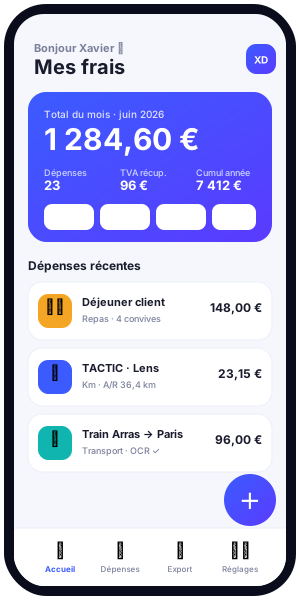
At Kwevio, data security and privacy are not afterthoughts: they are the very foundation of the application. Built by Xavier Deloffre (FACEM WEB, Arras), Kwevio is a free professional expense management application available on Android, iOS, and as a lightweight installable web app (PWA), designed to work across multiple countries and languages. Its promise is simple and honest: your data belongs to you. This page explains, without exaggeration or any claim of absolute invulnerability, how we protect your information, from account-free local operation to the secure back-end for those who choose multi-device synchronization.

A privacy-first philosophy
Privacy by design guides every technical decision behind Kwevio. Rather than collecting as much information as possible "just in case," we apply the opposite principle: process only what is strictly necessary for the service provided. A secure expense report starts with a basic rule: the less your data travels, the less it is exposed. That is why Kwevio was architected so that default usage requires no account, no server, and no transfer of your receipts.
This approach answers a legitimate concern among professionals and freelancers: the fear of handing sensitive financial and tax information to a remote platform. With Kwevio, you stay in control. Privacy is not a marketing slogan; it is a constraint we impose on ourselves in the code itself. We would rather be transparent about what the app actually does than promise a perfect security that exists nowhere.
Why "local-first" changes everything
In most expense management apps, your receipts, trips, and amounts are immediately sent to the vendor's servers. Kwevio reverses this logic. By default, everything stays on your device. This drastically reduces the exposure surface: there is simply no centralized copy of your data to be hacked, resold, or exploited without your knowledge. This "local-first" philosophy is the heart of Kwevio's privacy.
Account-free operation and local data
Kwevio works entirely without creating an account. From the very first launch, you can record your expenses, photograph your receipts, and generate your expense reports without ever providing an email address, a phone number, or a password. No sign-up barrier, no identity collection.
The data you enter is stored locally on your device, in your browser or app storage. Concretely, your expenses, categories, mileage trips, and receipt images live in the memory of your phone, tablet, or computer. They do not travel to a server unless you explicitly enable a feature that requires it, such as multi-device synchronization.
What local storage means for you
- Maximum privacy by default: no one but you has access to your data as long as it remains local.
- Offline availability: you can work even without an Internet connection, on a train, a plane, or in an uncovered area.
- Shared responsibility: because the data lives on your device, backing it up also depends on you. We offer export and synchronization to help you avoid losses.
- No silent profiling: with no account or central server, there is no commercial profile built behind your back.
This local data model is arguably the strongest privacy guarantee an application can offer: what never leaves your device cannot leak elsewhere.
On-device OCR: your receipts stay put
Optical character recognition (OCR) automatically extracts amounts, dates, and labels from your photographed receipts. In many tools, this operation is handed to a remote server: your receipt is sent, analyzed, and sometimes kept somewhere else. Kwevio makes a radically different choice.
Receipt OCR runs 100% on your device, using the Tesseract.js library. Image analysis takes place entirely within your browser or app, locally. Your receipts are not transmitted to a server to be read. The photo of your restaurant ticket, your hotel invoice, or your fuel receipt stays with you, from the start to the end of processing.
The benefits of local OCR
- No image transmission: the content of your receipts is never sent to our systems for text recognition.
- Processing even offline: extraction works without a connection, since it needs no external service.
- Respect for business confidentiality: sometimes sensitive information (clients, locations, amounts) never leaves your device.
This embedded OCR perfectly illustrates Kwevio's philosophy: deliver an advanced, convenient feature without sacrificing privacy. The comfort of automation should never be paid for with the exposure of your data.
Read-only, opt-in calendar
To help you reconstruct your business trips, Kwevio can connect to your Google Calendar to retrieve your appointments and travels. This connection is strictly optional and based on the opt-in principle: it is never enabled without your voluntary action and explicit consent.
Above all, calendar access is limited to read-only. Kwevio can consult your events to help you link a trip to an expense, but it can neither modify, delete, nor create events in your calendar. You grant a minimal permission, and only for the specific purpose for which it is requested.
You stay in control of this connection
- Voluntary activation: nothing connects until you decide it should.
- Minimal scope: read-only, no writing to your calendar.
- Revocable at any time: you can withdraw access from your Google account or the app settings.
This behavior respects the minimization principle: we ask only for what is useful, and only with your agreement.
Optional account security
If you want to access your expense reports across several devices, you can create an account. This is an entirely optional choice. When you take that step, the back-end hosting your synchronized data is designed with particular care for security.
Protected passwords
Your password is never stored in plain text. It is hashed using the scrypt algorithm, combined with a unique salt. Hashing with scrypt is deliberately computationally expensive, which makes brute-force and dictionary attacks much harder. Even in the event of an incident, your passwords are not readable as such.
Hashed, revocable, and expirable session tokens
To keep you signed in, Kwevio uses randomly generated session tokens. These tokens are not kept in plain text on the server side: they are stored in hashed form. They are also revocable (you can invalidate a session) and expirable (they do not last indefinitely). Should a token be compromised, its scope and lifetime remain limited.
Strict per-user isolation
Each user is compartmentalized. Queries guarantee that an account can only access its own data: there is no path allowing one user to view another's expenses. This per-user isolation is a fundamental protection against lateral leaks.
Additional technical defenses
- Prepared SQL statements: parameters are systematically separated from commands, which prevents SQL injection.
- Rate limiting: the number of attempts is capped to counter brute-force attacks on credentials.
- Security headers: HTTP headers strengthen browser protection against certain classes of attacks.
- Restricted CORS: only authorized origins can communicate with the API.
- HTTPS/TLS: all exchanges with the server are encrypted in transit through TLS.
Communication encryption, data isolation, and server hardening form a coherent whole. We do not claim that no attack is ever possible — no honest platform can — but we apply recognized best practices to reduce the risks.
Secure synchronization
Multi-device synchronization relies on a clear principle: "last write wins." When a piece of data is modified on several devices, the most recent version prevails. Deletions are also propagated, so that an item erased on one device truly disappears on the others and does not reappear by accident.
This synchronization runs over the encrypted HTTPS/TLS channel and respects per-user isolation. You keep your data consistent across your phone, tablet, and computer without giving up security. And because the account remains optional, you decide for yourself whether your data leaves the device to be synchronized.
GDPR compliance
Kwevio is designed in compliance with the General Data Protection Regulation (GDPR). This compliance translates concretely on several levels.
Data minimization
We collect only the data necessary for the service to function. Without an account, no personal identification data is required. With an account, only the information essential to synchronization is processed. Minimization is applied by default, not as an exception.
Explicit consent
Access to your calendar and the use of your photos rely on explicit consent. Nothing is enabled silently: you grant each permission knowingly, and you can withdraw it.
Export and deletion rights
You have effective rights over your data: you can export it to keep a copy or transfer it, and you can delete it. These rights are at the core of the "your data belongs to you" promise. Hosting of the synchronized part is controlled, allowing us to retain control over the processing conditions.
- Export: retrieve your expense reports in a reusable format.
- Deletion: erase your data, both locally and on the server if you have an account.
- Transparency: you know what is processed and why.
Transparency about the future reviews and content layer
Kwevio is free. To ensure its sustainability, a future content and reviews layer may be offered as a monetization avenue. We want to be transparent now about how it will respect your privacy.
Participation in this layer will be opt-in: it will only concern users who explicitly choose to take part. Aggregated content will be anonymized following the k-anonymity principle, so that no review or data can be linked to an identifiable individual. If advertising is served, it will be in compliance with GDPR and the ePrivacy directive, with consent collected. No exploitation of your data will occur without your prior agreement.
User best practices
Security is a shared responsibility. To get the most out of the privacy Kwevio offers, here are a few simple recommendations.
- Lock your device: since your data is local, protect your phone or computer with a passcode, fingerprint, or password.
- Choose a strong password: if you create an account, use a long, unique password, ideally managed by a password manager.
- Back up via export: export your data regularly to avoid losing anything in case of device loss or reset.
- Limit permissions: only enable calendar and photo access if you use them, and revoke them if needed.
- Sign out unused devices: revoke sessions for devices you no longer use.
- Update the app: updates include security improvements.
These simple habits reinforce an architecture already designed for privacy.
Understanding the threats we want to avoid
To fully appreciate Kwevio's design choices, it helps to understand what they protect against. Professional expense data reveals a great deal: where you travel, which clients you work with, how often you move, how much you spend, and according to what patterns. In the wrong hands, this information can be used for commercial profiling, competitive espionage, or even social engineering attempts. By keeping this data local by default, Kwevio removes the most tempting target at the root: the large, centralized warehouse of financial data.
The massive data breaches that regularly make headlines almost always involve centralized databases. When an application does not amass your information on a server, that structural risk disappears. It is a difference in kind, not merely in degree, in the approach to privacy.
The hidden cost of "free" elsewhere
Many free services pay for themselves by exploiting their users' data. Kwevio is free, but it does not follow this model: by default, there is no centralized collection to monetize. The future reviews layer, when it exists, will be strictly opt-in and anonymized. Kwevio's free model therefore does not rely on the silent commodification of your privacy.
The role of the PWA in privacy
Kwevio is distributed as a lightweight installable web app (PWA). This format offers concrete privacy advantages. A PWA runs in the browser's isolated sandbox, which applies its own security safeguards. You do not need to grant broad system permissions the way a traditional native app sometimes would. Installation can happen without necessarily going through a store that would track your downloads.
The local storage used by the PWA remains confined to your device and your browser. You can inspect it, clear it, and control it with your system's usual tools. This transparency of the underlying technology reinforces the central idea: nothing happens behind the scenes without you being able to observe it.
Frequently asked security questions
Are my receipts sent anywhere when I scan them?
No. Text recognition runs entirely on your device via Tesseract.js. The image of your receipt is not transmitted to a server for analysis.
Do I have to create an account to use Kwevio?
No. The app is fully functional without an account. The account is only for multi-device synchronization, and it is entirely optional.
What happens if I lose my phone?
If your data was only local, it disappears with the device — hence the importance of exporting regularly or enabling synchronization. If you had an account, you can recover your synchronized data on a new device, then revoke the lost device's session.
Can Kwevio modify my Google Calendar?
No. Access is read-only and opt-in. Kwevio can consult your events to help you, but cannot write anything to them.
How can I delete all my data?
You can erase local data from the app or your browser, and delete your server data if you have an account. The right to deletion is an integral part of our GDPR compliance.
Privacy across countries and languages
Kwevio is multilingual and multi-country by design, which raises a natural question: does crossing borders weaken your privacy? With Kwevio, the answer is no. Because the default model keeps data local, your information does not become subject to a patchwork of foreign processing arrangements simply because you travel or work abroad. Your receipts and trips stay on your device regardless of where you are.
For users who enable the optional account, the hosting of synchronized data is controlled, and we apply the same GDPR-aligned principles consistently. Whether you record a taxi fare in one country or a hotel night in another, the same minimization, the same encryption in transit, and the same per-user isolation apply. Privacy should not depend on your postcode, and Kwevio treats it as a universal commitment rather than a regional feature.
Consistency you can rely on
Multi-country support is about convenience without compromise. You adapt currencies, mileage rules, and languages to your context, while the underlying privacy guarantees remain stable. This consistency is part of what makes a secure expense report trustworthy over the long term, trip after trip, country after country.
Conclusion: privacy as a commitment
Kwevio shows that it is possible to offer professional expense management that is practical, free, and respectful of privacy all at once. Local data by default, on-device OCR, read-only and opt-in calendar, an optional account secured with scrypt, hashed and revocable tokens, user isolation, TLS encryption, GDPR compliance, and transparency about the future: every building block is designed so that your data stays yours. We do not promise magical invulnerability, but a constant commitment to applying best practices and staying honest with you.
See for yourself what a secure expense report feels like, with no account and no hassle. Launch Kwevio now